Appearance
Time corrections
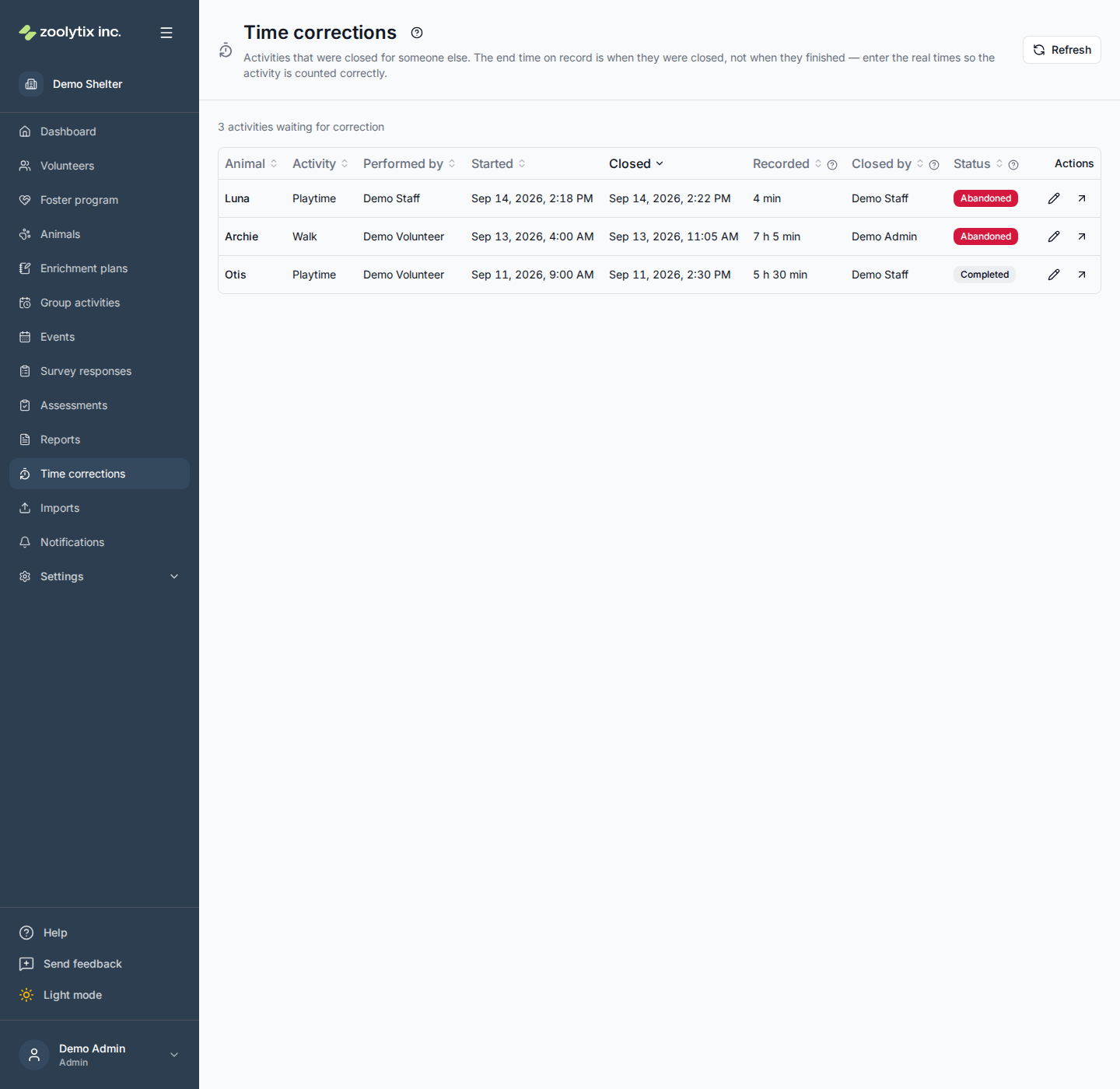
When a volunteer forgets to end an activity, someone with permission closes it for them from the dashboard using Override end. That fixes the animal's status — but the end time it records is the moment the record was closed, not when the activity finished. A walk that ended at 9:40 and was noticed at 4pm reads as seven hours. This page lists those activities so someone who knows what happened can enter the real times.
Who can use this page: anyone whose role can override activities — administrators and staff by default. It is the same permission that closes an activity for someone else.
What you can do here
- See which activities were closed for someone else
- Enter the real start and end of an activity
- Open the activity's full record
Why these activities are listed
An activity's end time is normally observed: the person running it tapped End. When someone else closes it instead, nobody observed the end, so the length on record is not a measurement of care — it is how long the record sat open before someone noticed. ShelterSync marks such activities as not trusted until a person corrects them, and lists them here.
Two things follow from that:
- The closer's choice of status does not matter. When closing a stuck activity you pick Completed or Abandoned. Picking Completed does not make the clock right, so both kinds are listed here, and correcting the times leaves the status exactly as it was. An abandoned activity stays abandoned; it just gets an accurate length.
- A correction is what makes the time trustworthy. Once corrected, the activity is treated like any other and its minutes count everywhere — the dashboard, the reports and their downloads, goal progress, volunteer totals. Until then it is left out of all of them, so every row on this page is minutes missing from your figures (see which activities count). The work happened; its length just needs a person to say what it was.
Reading the page
Each row is one activity, newest closed first. Sort any column by clicking its heading.
- Animal, Activity and Performed by identify the session. The animal's name opens its profile.
- Started is when the person tapped Start — usually right.
- Closed is when someone closed the record, and Closed by is who did it.
- Recorded is the length as it stands, from start to closed, leaving out any time the volunteer had the activity paused, and rounded up to the next whole minute — the rule the reports and the dashboard's activity minutes use (goal progress, which counts only whole minutes actually spent, rounds down instead) — so a session of 7 minutes 10 seconds reads 8 min (this page used to round to the nearest minute, and read 7). On this page that number is the problem, not the answer. Correcting the times keeps each pause the volunteer recorded, with its own start and end: a pause that falls outside the corrected times stops counting, one that falls partly inside counts only for the part inside, and one inside counts in full.
- Status is what the closer picked.
Use the arrow at the end of a row to open the activity's full record — its notes, surveys and safety alerts — when you need more context before deciding.
Correcting an activity
- Find the activity and click the pencil (Correct times) at the end of its row.
- Check Started. It is filled in from the record because the start is usually right. Change it only if you know it was wrong too.
- Enter when the activity Actually ended, in your local time. This field is left blank on purpose so the wrong time cannot be saved by accident.
- Give a Reason — how you know the real times: the volunteer told you, the kennel log shows the return, and so on. At least 10 characters.
- Click Save corrected times.
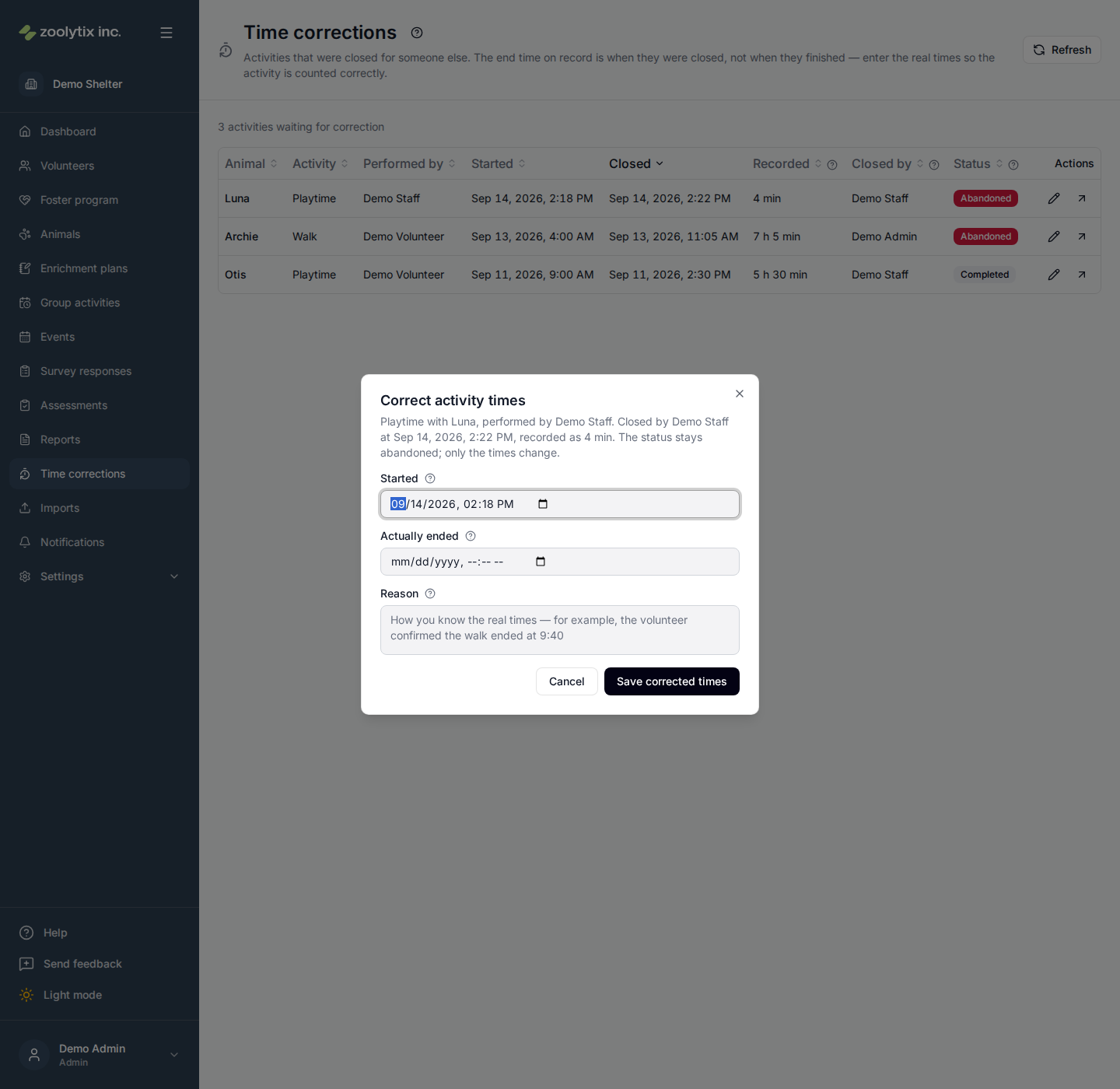
The activity leaves the list and its new length shows in a confirmation. The end must be after the start, cannot be in the future, and can be at most 12 hours after the start — the same limit as logging a past session. If the real session was longer than that, correct it to the part you can vouch for and note the rest in the reason.
Every correction is written to the Activity & security log with your name, the old and new times, and your reason, so anyone can see what was changed and why.
Fields explained
| Field | What it means |
|---|---|
| Recorded | The length of the activity as it stands — from its start to the moment it was closed, not counting any time the volunteer had it paused, rounded up to the next whole minute — the rule the reports and the dashboard's activity minutes use (goal progress, which counts only whole minutes actually spent, rounds down instead). On this page that number is the problem, not the answer: a walk that ended at 9:40 and was closed at 4pm reads as seven hours. Correcting the times keeps each pause the volunteer recorded, with its own start and end: one outside the corrected times stops counting, one partly inside counts only for the part inside, and one inside counts in full. |
| Closed by | The person who closed the activity on the volunteer's behalf, and when. That moment is what the end time currently records. |
| Status | Whether the closer marked the activity completed or abandoned. Correcting the times leaves this alone: an abandoned activity stays abandoned, it just gets an accurate length. Both kinds are listed here because choosing Completed when closing does not make the clock right. |
| Started | When the activity began. It is filled in from the record because the start is usually right — the person did tap Start. Change it only if you know it was wrong too. |
| Actually ended | When the activity really finished, in your local time. It is left blank on purpose so the wrong time cannot be saved by accident. It must be after the start, not in the future, and no more than 12 hours after the start. |
| Reason | How you know the real times — for example, the volunteer told you, or the kennel log shows the return. At least 10 characters. It is kept in the audit log with the old and new times and your name. |